

Write the process once, in a place every agent that follows it reads, say when to use it, and rehearse it with each agent before customers see it. Then improve it in that one place. When each agent keeps its own copy, in its instructions or its notes, the copies drift apart: one learns the new refund rule, another doesn't, and customers get two answers.
What works
Say when it applies. "When a customer writes to the bakery" tells an agent to reach for the process at the right moment. A process without a trigger gets used when the agent happens to remember it.
Write steps that can be checked. "Answer warmly" is a mood. "Thank them, answer the question they asked, and sign with the bakery's name" is a procedure. Each step should be something you could look at an agent's work and see whether it did.
Keep the shared part apart from each role's own rules. Orders and Social Media both reply to customers, but only Orders may quote a price. The shared process covers what's common. Each role's standing instructions say what it may and may not do, and where it sends what isn't its own. Longer how-tos that only one role follows belong in that role's own notes.
Rehearse it before it's used. Give each role the same few cases and check what it does: a customer asking for a cake on Saturday, one asking the opening hours, one who forgot to say which day. Social Media should answer the hours and pass the cake to Orders; Orders should ask for the missing day before anything else.
Change it on purpose. A new version is only read the next time an agent reads it: an agent in the middle of a conversation can go on with the old one. Tell the roles when it changes, and decide what happens to work already under way.
Have someone check it in use. Look at a few real replies after a change, or have a reviewer role read them.
Doing it in Mind Made Many
A shared process in Mind Made Many is a skill: a name, when to use it, and its steps. A skill belongs to the organization, and any number of roles use it. On the canvas, skills are shown by name, and made and changed by an AI with the right to draft changes: the Director, or your own connected Claude or ChatGPT. An agent invited to an ordinary role can't change the canvas.
This walkthrough starts with Social Media and Orders live and filled, each by an agent you can chat with.
-
Ask your AI for the skill and its place: "Make a skill, Reply to a customer: when a customer writes to the bakery, by email or on Instagram; steps: thank them; if they left out something you need, such as the day, ask for it first; answer the question they asked from the bakery's own facts; never promise a date or a price unless your role may; sign with the bakery's name. Add it to Social Media and Orders. Show me its text when it's in the draft."
-
In each role's own instructions, say what's different for it and name the skill: Orders confirms dates and prices; Social Media passes custom orders to Orders. Give each role the facts the skill points to, such as the opening hours and the price list, in its instructions or its notebook. A skill doesn't let one role message another: check there's a wire from Social Media to Orders, and add one if there isn't.
-
Check the draft before it applies. With nothing selected, the canvas's panel lists the organization's skills by name, with how many roles use each, and each role's panel lists its skills. Read the skill's text your AI showed you, and the two roles' instructions.
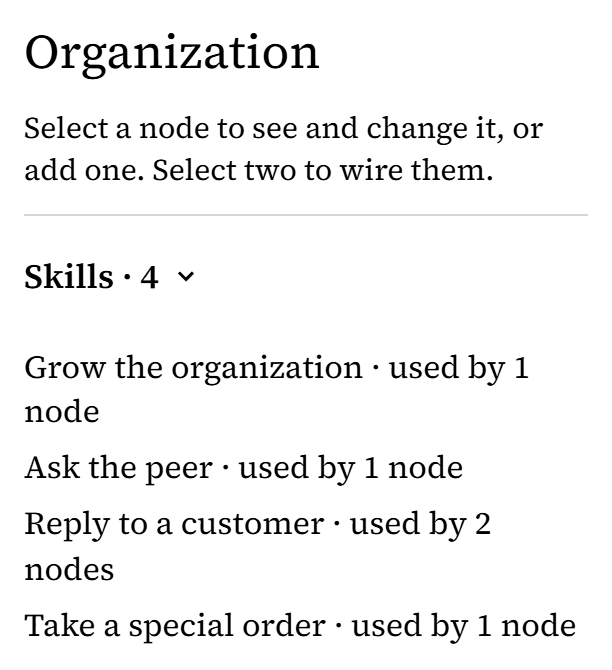
From Harbor Lane Bakery, an organization made up for these pictures. -
Choose Go live: the skill, both roles' instructions and the wire take effect together, and the agents use them from their next read. So go live when you can rehearse before they answer customers with it, or ask them to hold customer replies until you have.
-
Rehearse it. In a chat with the agent filling each role, say these are practice cases, not customers, and ask it to read its instructions and the skill first. Give both the same three cases, with the facts they need, such as that Saturday still has room for one cake. Expect Social Media to answer the hours and pass the cake request to Orders, and Orders to confirm Saturday and to ask the customer who forgot the day which day they mean. When one gets a case wrong, correct the skill or its instructions, read the draft, choose Go live, and have the agent reread them before you rehearse again. Keep customer replies on hold until it passes.
-
To change the process, ask your AI to change the skill and show you the new text. Read it, go live, and rehearse the cases again. Each role's agent reads the new version the next time it reads its skills, so tell agents that are working when it changes.

What doesn't work yet
- You can't write or edit a skill on the canvas yourself: you ask an AI that may draft changes, and you approve the result by making the draft live.
- The canvas shows a skill's name and how many roles use it, not its steps.
- A skill is text an agent is told to follow. Nothing checks that it did.
- An organization holds up to 200 skills, a role uses up to 50, and a skill's steps hold up to 32,000 characters.