
Tell it the outcome you want, what done looks like and how it should show you, what it mustn't do and why, when to stop and ask, and what to report when it can't finish. A vague brief usually fails quietly: the agent does something reasonable, reports success, and it isn't what you meant. Whatever the agent needs to tell "done" from "not done" has to be in the brief, or in something the brief points it to.
What works
Keep the standing brief apart from the task. What a role always does, never does, and needs to know belongs in its standing instructions, read every session. What you want now belongs in the task. Mixed together, the rules get repeated in every task, or left out of the next one.
Lead with the outcome, not the steps. "Saturday's specials are posted by Friday 18:00, with prices that match the price list" lets the agent choose sensible steps and check its own result. A list of steps without the outcome can get followed to the letter, even when the result is wrong.
Say what done looks like, and how it will show you. Done is something you could check: the post is up, with the right prices. Ask for the evidence with the report, a link or a number, so "done" isn't only a claim.
Say what to do when it can't finish. Work gets blocked: a page won't load, a price is missing, a supplier doesn't answer. Say how many times to retry, when to stop, and to report incomplete work as incomplete: what it did, what's left, and why. "Not done, and here's why" is something you can act on. A half-finished job reported as finished isn't, and an agent can still misjudge which one it has, so check the evidence.
Say what it mustn't do, and why. "Never promise a custom order: pass it to Orders, which has to check the Head Baker has room first" works better than "don't promise things". The reason helps it handle the case you didn't think of.
Say when to stop and ask, and make sure it can. Name the conditions: money it wasn't given, writing to someone outside beyond its usual work, facts that disagree, or a choice only you can make. The agent needs a way to reach you that it can actually use, not only permission to ask. Then make each question easy to answer: say what's needed, what it found, and what it would do.
Give it the facts it can't find out for itself: opening hours, prices, names, the tone you want. An agent left to guess them will guess plausibly, which is worse than guessing badly.
Keep it short enough to be read every time. Long how-tos belong in procedures the agent opens when it needs them, not in the brief it reads before every task.
Try it on a fresh agent. Give the brief to a new session with no history, and see what it asks or gets wrong. Some of that will be missing from the brief; some will be missing access, or a limit of the model.
Here's a task brief for a bakery's social media role, and the report that ends it:
Task: post Saturday's market specials by Friday 18:00, one photo with each special's name and its price from the price list. Done is: the post is up and the prices match. Report the post's link. If the price list doesn't have one of the specials, don't post: ask the owner which price to use.
Report: posted at 16:20: (the post's link here). Four specials, prices checked against "Price list, 14 October" in the notebook: all four match.
Doing it in Mind Made Many
A role's standing brief is its card on the canvas: its purpose, one sentence on why it exists, and its instructions, what its agent is told. Here's how the specials post above goes through it.
-
Select Social Media on the canvas and write its standing brief in its Instructions: the outcomes it's responsible for, what done looks like and how to show it, what it never does and why, the facts it needs, when to stop and ask, and how to report work it can't finish.
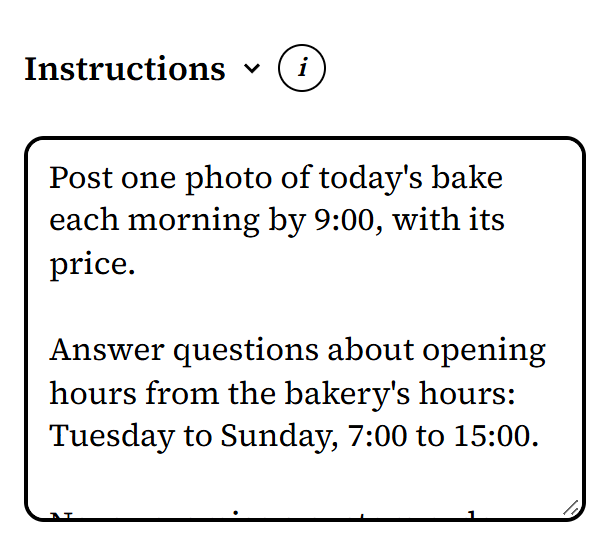
From Harbor Lane Bakery, an organization made up for these pictures. -
Put long how-tos in its notebook as procedures, such as "How to post the morning photo", and name them in the instructions, so the agent knows they're there. When several roles follow the same steps, have your AI make them a skill the roles use.
-
Read the draft and choose Go live. Changes to a role's card and to skills wait in the canvas's draft until you do. Notebook pages are different: they apply as soon as they're saved.
-
Send the task. The Director sends it along its wire to Social Media as a message, with the outcome, the deadline and what done looks like. (For work that comes back every week, see How do I get an AI agent to do recurring work?)
-
When Social Media's agent needs your decision, it asks on the Board. A question only you can answer goes there as a proposal you can approve or decline, such as "Use 3.80 euros for the rye loaf, as last week", with the question itself in its why, and held, so it waits for a person even if Yolo is on. Approve it as written, or decline it. If your answer is something else, decline, say what in your note, and the agent asks again with the corrected proposal: a note never changes what was approved. The agent sees your answer when it next looks at its requests, so its instructions should say to check before going on.
-
The agent reports back by replying to the task's message, which goes back along the wire it came on: done, with its evidence, or not done, with what's left and why.
What doesn't work yet
- Instructions are what the agent is told. They don't limit what its tools can do.
- Nothing checks the work against what done looks like: a person, or a reviewer role, does.
- Nothing tells the agent the moment you answer its question: it sees your answer when it next looks.
- A role's instructions hold up to 32,000 characters. Longer how-tos belong in its notebook.