
Control has two layers, and it needs both. The first is what each agent can reach: an agent with no way to send email can't email a customer, whatever it decides. The second is what it has to ask for: the actions that need a person go to a person, in words they can judge, before anything happens. Rules about asking, with nothing behind them, depend on the agent following them. Limits on reach, with no way to ask, leave the agent stuck. Add a way to stop things and see what happened, and people stay in charge without watching every step.
What works
Limit what each agent can reach to what its job needs. Give it the accounts, the keys and the contacts its role uses, and nothing more. This is the layer that holds when an agent misreads its instructions, so think about it first.
Name what needs a yes. It's usually money spent, anything sent or published outside the organization, new accounts, contracts, and anything that's hard to undo. Write it into each role's instructions, so the agent knows before it acts.
Give room within limits, rather than all or nothing. Asking for every customer email wears people out, and then they approve without reading. Let an agent do a kind of action on its own within stated limits, such as replies about orders already confirmed, and ask beyond them. Look at the limits again when the work changes.
Approve the exact thing. The agent writes what it will do, precisely: to whom, how much, and the words themselves. A yes covers that and nothing else. Anything different is a new ask.
Ask in plain words. A person running an organization shouldn't have to read code or request headers to decide. The agent explains in a sentence what it will do and why; the detail can sit underneath.
Keep every ask in one place, with a name on each answer. Approvals scattered across chats get missed, or answered twice in different ways.
Keep the organization itself in people's hands. Agents can propose new roles, connections and instructions. People decide when those take effect.
Know how to stop it, and what each way of stopping does. Cutting off an agent's access, revoking a key it uses and taking it off its role are different things, and none of them recalls what was already done.
At a bakery, Orders may answer questions about orders already confirmed, on its own. Any date or price promised to a customer needs the owner's yes. So when Ms. Jansen asks for a birthday cake, Orders asks first, with the email it wants to send: "Dear Ms. Jansen, we can make your chocolate birthday cake for 12 people for Saturday 24 October. It's 46 euros, with a 20 euro deposit to confirm. Harbor Lane Bakery." The owner approves it, and Orders sends that email.
Doing it in Mind Made Many
The board is the people who run an organization: you, and anyone you add as a board member. Whatever an agent needs a person's yes for waits on the Board page, and only a board member answers it, from their own signed-in page. No agent can, the Director included.
-
Select a role on the canvas, and in its Instructions say what it may do on its own, within what limits, and what needs the board's yes. Changes to how the organization works, such as roles, wires, instructions and schedules, wait in a draft, whoever made them, your own AIs and the Director included. Only a board member makes the draft live, on the canvas, and Go live makes all of it live, so read it all first.
-
An agent that needs your yes for work or an action asks on the Board: a job, for work a role will do, or a request, for anything else, such as an email, a payment or a post. Read what it asks, why it needs you, and what a yes will do. Approve or Decline, with a note back if you like. A yes approves exactly what was written, and a note doesn't change it: an agent that's asked for something else has to ask again.
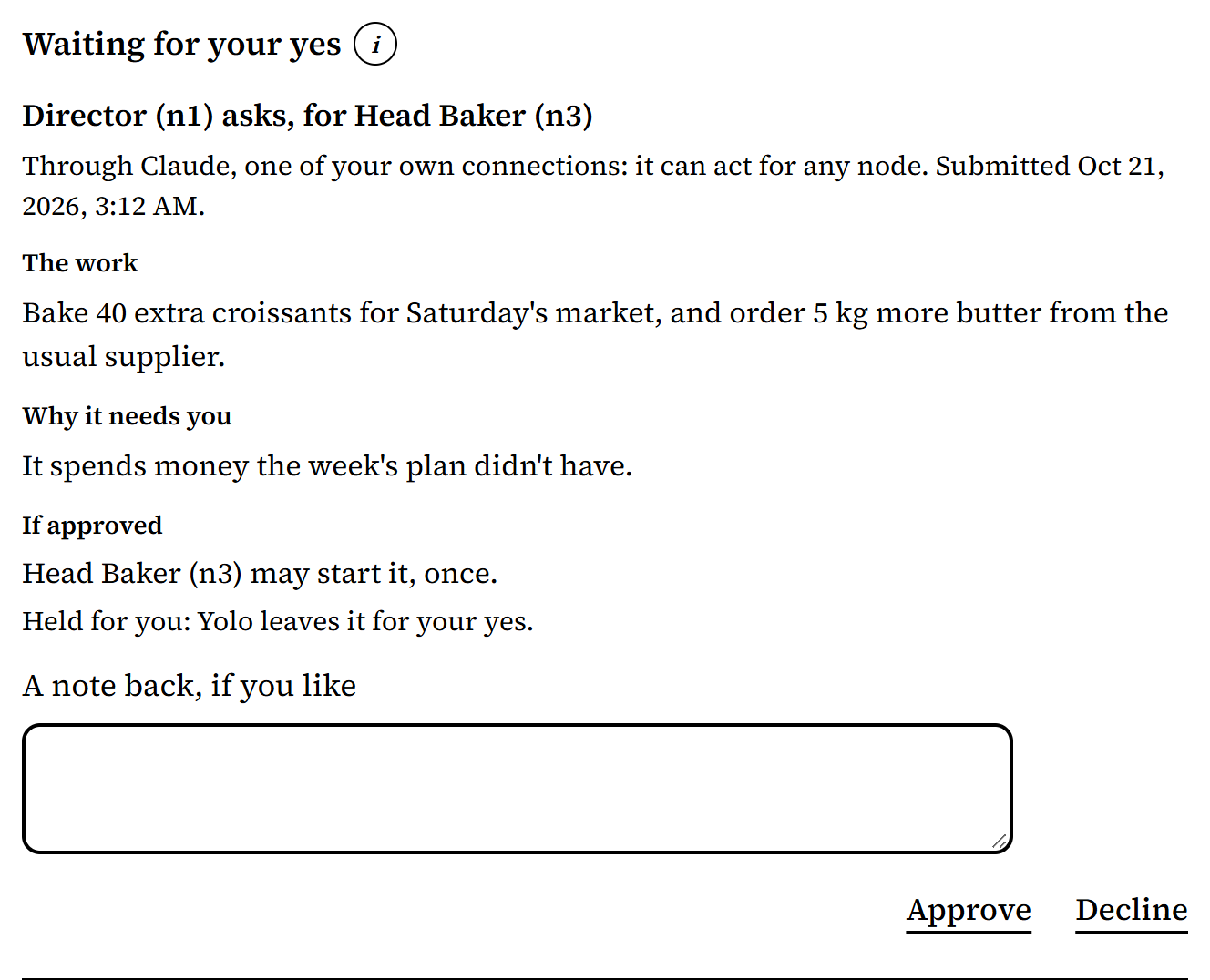
From Harbor Lane Bakery, an organization made up for these pictures. -
An agent that needs a key, such as a password or an API key, asks for a secret on the Board instead. You provide the value there, or decline. Mind Made Many then puts the value into the kinds of request the board approved, on the agent's behalf, rather than handing it over.
-
The agent sees your answer when it next looks at its jobs or requests, or asks for the secret again. Its instructions should say to check before it acts.
-
To stop something, use the control that does what you need. Disconnect, on Connections, ends your own Claude's or ChatGPT's access to your organizations: as the owner, your own AI can act as any role, so taking it off one role, in the role's panel, only takes its name off that role. Remove, on the Agents page, ends an invited agent's access to this organization. Revoke, under Share in Secrets, stops a secret from being used through Mind Made Many again; it doesn't cancel a request already sent, or cancel the key at its own service, which you do there.
-
To see what happened: the Board's Answered lists the jobs and requests answered, and who answered each. Share, in Secrets, shows each secret and its uses. The Messages between two roles show what they said to each other.
-
Yolo, at the top of the Board page, is off until a board member turns it on. While it's on, it approves every job and request the moment it arrives, except those an agent holds for a person, and it never provides a secret. It suits routine work by agents you trust, not agents that can reach money or customers.

What doesn't work yet
- A yes records your decision. Mind Made Many doesn't carry the action out, and it can't stop an agent from doing what its own tools outside Mind Made Many let it do. That's why reach comes first.
- Limits such as "up to 50 euros" or "these customers only" are words in a role's instructions, and nothing enforces them yet. A secret is limited to the roles and the kinds of request the board allowed, not to what's inside each request: an amount, say.
- Nothing tells an agent the moment you answer. It sees your answer when it next looks.
- An approved job can't be withdrawn from the Board. Its role may start it once.