

It depends on where the work was, and how far it got. Work still waiting, in a queue the role reads rather than in one agent's chat, survives an agent going offline: it's a delay, and someone can see it. Work the agent had already taken, or started, is the hard part. Only a record of what it took and what it did, and a check of what actually happened, tells the next agent whether to finish it, redo it or leave it. Agents go offline all the time: a chat is closed, a laptop sleeps, a provider has an outage, a usage limit is reached. Plan for it as the normal case.
What works
Keep waiting work outside the agent. Requests should wait in a queue that belongs to the role, not in a conversation that belongs to one session. Whatever comes while the agent is away is then still there when it, or another agent, comes back.
Let senders see when a role is away. A sender that knows its request is waiting for an agent that's offline can wait, try another way, or tell someone, instead of assuming it's being handled.
Record taken work apart from the message. Once an agent takes something on, it goes on the role's list of open work: what's been done so far, what's next and by when, and where to check the result. Once a request stops showing as waiting, unfinished work in it can be overlooked unless it has a record of its own.
Notice what's stuck, in all three forms: requests nobody has taken, work taken whose next step is overdue, and work started but never finished.
Check before redoing anything. An agent that went offline in the middle of an action may or may not have finished it. Look where the action happens, such as the bank's record of a payment or the account a post went to, not only at the notes. If you still can't tell, ask a person rather than repeat it.
Decide what happens to recurring work that was missed: run it late, skip to the next time, or ask someone.
Make replacing an agent a change of who does the role. When the role, its queue and its records are separate from the agent, a new agent starts from them rather than from nothing.
At a bakery, the Head Baker's agent goes offline on Thursday evening. The Director's question about the butter delivery waits in its queue, and after a few minutes the owner can see that it's waiting, and when the Head Baker was last seen. The Bookkeeper, meanwhile, had started paying the flour invoice when its session stopped. Its handover says "Paying the flour invoice: started 14:10". The next session checks the bank's record before paying, finds the payment went through, and writes that down.
Doing it in Mind Made Many
A role's messages, schedules, jobs and notebook belong to the role, not to the agent that fills it.
-
See what's waiting. On the Board, roles whose messages nobody has taken within 3 minutes are listed, up to 20 of them, each with how many messages wait, since when, and whether the role is online or when it was last seen. Whoever sends a message is told whether the recipient is online, and when it was last seen. On the Schedules page, each schedule's last run shows whether it was missed (nobody started it within an hour) or started with no end reported for 12 hours.
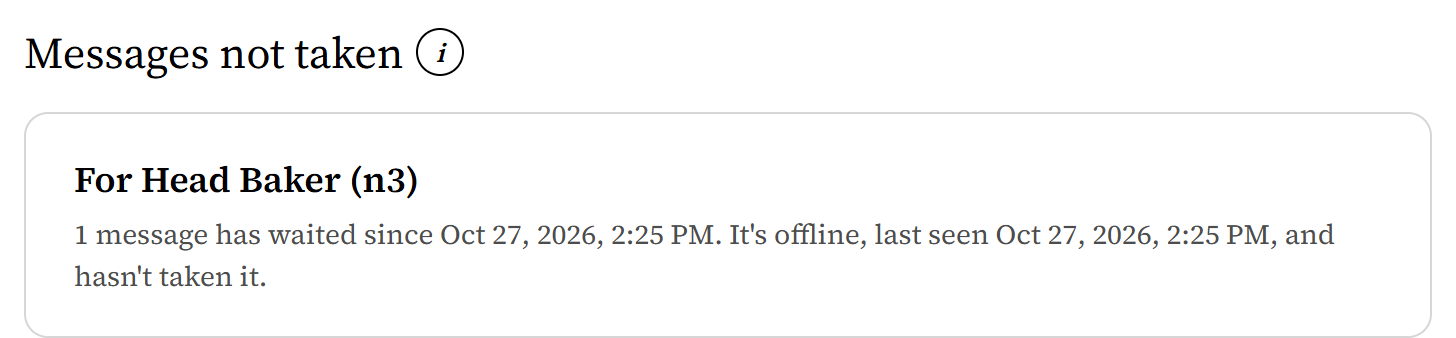
From Harbor Lane Bakery, an organization made up for these pictures. -
If the agent will be back, let the work wait. When it comes back, it reads its notebook's Start here and its messages, and checks interrupted work, as in step 4, before it goes on. It can still claim a missed run late, or leave it for the next time, if there is one: a schedule that runs once has no next time. Say which in its instructions.
-
If it won't be back soon, replace it: in the role's panel, under Who fills this role?, choose Remove beside its agent, then invite the new one there, send it the invite, and approve it on the Board, under Agents asking to join. Then ask the new agent to read the role's notebook first.
-
Have whichever agent picks the role up, the same one or a new one, check interrupted work before anything else: what Start here says was taken or started, against where the work actually happens. It writes down what it finds, and asks you on the Board about anything it can't establish. Have it hold such a question for a person: otherwise, while Yolo is on, it's approved as it arrives.

What doesn't work yet
- A started job can be ended only by the attempt that started it, through the same connection. A started schedule run can be ended by another agent only with that attempt's id, so have agents note it in Start here when they start a run. Otherwise it stays started, and work that's still needed goes in a new request, or waits for the next run.
- Once a message is taken, by a plain read or by confirming it, it no longer shows as waiting, even if the work in it wasn't done: only the role's own record shows it. Messages an agent hasn't confirmed stay waiting, and can be handed out again after 3 minutes.
- "Online" means an open connection, or a report that hasn't expired: a listener keeps a role online for a minute after each call, and a session for as long as it said it would run, up to a day, even if it stopped sooner. It doesn't prove the agent is still working.
- On the canvas, the card of a role whose approved agent has nothing live says Connected. The Board, listing messages not taken, calls the same role offline, with when it was last seen.
- Nothing hands a stuck role's work to another agent by itself. A person changes who fills it; a Director that runs the role as one of its own chats can start a new one.
- A role's inbox holds up to 200 messages not yet taken. Past that, new messages are refused until some are taken.