

Keep proposed changes in a draft that the team doesn't run on, get a list of exactly what changed, read it for what it does to work already under way, and apply it yourself, in one step. Agents are good at proposing changes to how they're organized: a new role, a new connection, sharper instructions. They shouldn't apply their own proposals, and nobody should apply a change they haven't read.
What works
Keep the team running on the current version meanwhile. While a change is being drafted, agents keep working as things are. Half-applied changes, where some roles follow the new instructions and others the old, cause more trouble than either version.
Start from a list of what changed: every difference between the draft and what's running now, whoever made it, not only what the drafter remembers doing. For changed instructions, read the old text and the new side by side. A removed role is the easiest change to miss when you only look at what's there.
Read each change for its effects, not only its wording. What happens to the work under way? If Orders hands wedding cakes to a new role, who finishes the wedding quote Orders started yesterday, and from when does the new role answer? A schedule moved to another time can skip or double a run: move the daily 08:30 post to 18:00, with the change taking effect at noon, and that day gets a second post. A new connection lets one role message another that never heard from it before.
Look hardest at who can reach whom. A change that lets one role message every other, or every role message one, changes the whole organization at once. It deserves its own yes.
Walk one real piece of work through the new design. Take a recent enquiry and follow it role by role: who receives it, who owns each step, where it goes when the answer is no. If you can't, the design isn't ready.
Keep a way back, and know its limits. Throwing away a draft should be one step. Undoing a change that has already gone live is not always the same as never having made it: an agent taken off a removed role doesn't come back by itself.
Try big redesigns in a copy that doesn't run, and know that it shows the design, not that the design works.
Know what isn't in the draft. Some changes take effect at once in most systems, such as notes an agent writes for itself, or who is assigned to a role.
At a bakery, the Director proposes splitting wedding cakes out of Orders. The owner asks it for the list: a new role, Wedding cakes; Orders' instructions changed to pass wedding requests on; wires copied to the new role. She walks Ms. Okafor's wedding enquiry through it and finds that Social Media, which receives most enquiries, can't reach the new role, and that Orders' half-finished quote has no owner. She asks the Director to add the wire and to say Orders finishes quotes it has started. She reads the changed parts again, and makes it live.
Doing it in Mind Made Many
Every organization has a live version, which agents work in, and, while it's being changed, a draft beside it. Changes to roles, wires, instructions, skills, schedules, reaches and doors go into the draft, whoever makes them: you on the canvas, your own AIs, the Director. Only a board member makes draft changes live: with Go live on the canvas, or, for a sandbox's Director, by making the sandbox an organization (below).
-
When there's a draft, the canvas says "Editing: changes aren't live yet", with Go live and Discard beside it. The canvas shows the draft, and agents keep working in the live organization.
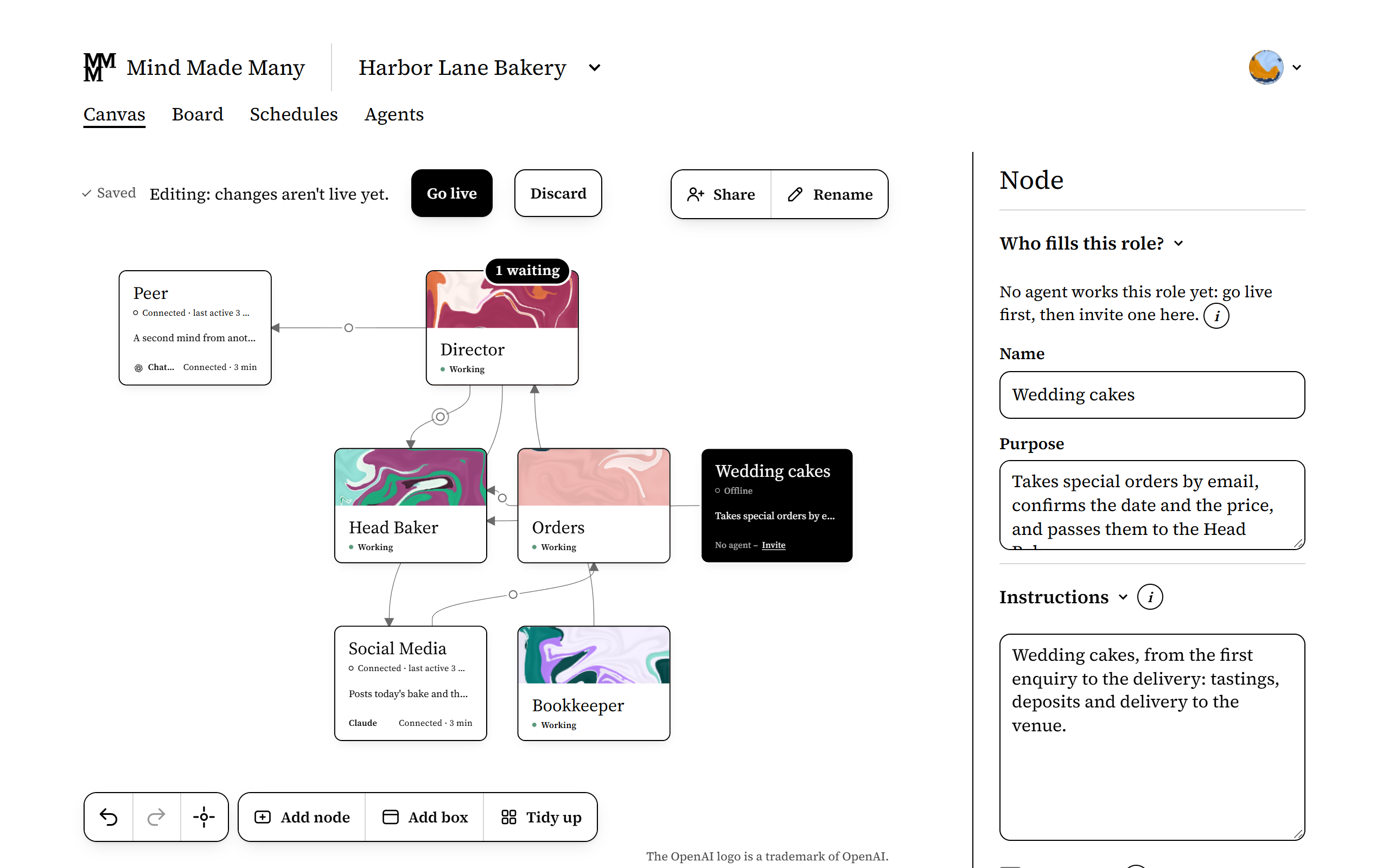
From Harbor Lane Bakery, an organization made up for these pictures. -
Ask your own Claude or ChatGPT, or the Director, to compare the draft with the live organization and list every difference, whoever made it: roles and wires added, removed and changed, and for changed instructions and skills, the old text and the new. Mind Made Many doesn't show such a list itself yet; your own AI and the Director can read both versions. Then check each item on the canvas: select the changed roles and wires and look at their names, purposes, instructions, who reports to whom, and schedules. The canvas shows skills by name, so read their steps in the list.
-
Check what it does to work under way. A role removed, or folded into another, takes its invited agent's place with it once it's live. If the draft changes a schedule's time, its panel says it runs the new way once the draft is live.
-
Choose Go live. What goes live is the canvas as your page shows it at that moment. If the draft gives a role a reach (it may message every role) or a door (every role may message it), Go live names who gets it and asks you to confirm. The canvas takes in changes others make while it's open, so if you see it change while you're reviewing, read the changed parts again.

Instead of going live, you can drop the draft: choose Discard, and the canvas goes back to what's live. Right after, Undo brings the draft's changes on the canvas back, as long as nobody has changed the canvas since; changes to reaches and doors don't come back with it.
For a big redesign, make a sandbox on the Organizations page: an organization of its own for drafting, in which nothing runs and which never goes live as it is. To start a new organization from it, the account that made the sandbox chooses Make it an organization. Its Director, the role named Director that reports to the board, or a new one if there's none, is live at once; the rest of its canvas stays a draft until you go live. If the sandbox already has a Director, read its instructions before you choose it. To bring a sandbox's ideas into an existing organization, copy roles from it and paste them into that organization's canvas, where they're a draft like any other change.
What doesn't work yet
- There's no list of a draft's changes yet: you ask an AI that can read both versions, and check the canvas.
- Moving or resizing cards, and moving boxes, doesn't need Go live on its own; while there's a draft, it's part of it. Approving an agent for a role, a role's wake-ups a day, and changes to a role's notebook take effect at once: none of them is part of the draft.
- Pasting roles adds new roles beside the existing ones; it doesn't replace them. Their schedules don't come along, and of their wires, only those between pasted roles. A pasted role keeps a skill, or a manager that wasn't pasted with it, only where the organization has one with the same id, which may be a different one: check each pasted role's skills and whom it reports to.
- Restoring a role after it was removed doesn't bring back the invited agent that filled it: it needs a new invite.