

Share the organization, not a login. Each person comes in as themselves, with the rights their part needs, and answers what the agents ask in one place everyone can see, with their name on each answer. Then agree on the one thing software can't decide for you: what happens when two of you want different things. When two people share one account, or take turns in one AI's chat, each has all the access there is, and who decided what rests on what they remember.
What works
Look at the same thing. Everyone who steers the team should see the same roles, the same channels and the same waiting decisions. Decisions made in one person's private chat with an agent can stay invisible to the other, unless they're recorded where both can see them.
Sign in as yourself. Separate sign-ins mean each answer carries a name you can trust, and one person's access can be ended without ending everyone's.
Give people the rights their part needs. Some decide: they approve, and change how the team is organized. Others follow along: an accountant who needs to see how the books are kept, a colleague who wants to watch. Where you can, limit who decides what, not only who decides.
Keep one queue for what the agents ask, with names on the answers. Any of the people who decide can answer what's waiting, and everyone can see who answered what.
Agree who settles a conflict, before the first one. Two people can each approve something reasonable that the other wouldn't have: a refund and a reminder for the same order. Decide which decisions need one person and which need both, who has the last word in each area, and that before asking the agents for anything new, you look at what's already been asked.
Know what joining gives a person's own AI. Someone who joins to decide may also have an AI connected to the same service. Be clear whether their AI may work in the organization, and on what, and tie its access to theirs, so it ends when theirs does.
At a bakery run by two partners, the owner set it up, and her partner Sam keeps the books. A Claude of Sam's, invited to the Bookkeeper's role, does its work. They agree that Sam has the last word on money and the owner on everything else, and that a refund over 100 euros needs them both, which they settle between themselves before either approves it. When Orders asks to email a customer about a wedding cake, whichever of them sees it first answers, and the other sees who did. Their accountant can look at the organization, but can't change or approve anything.
Doing it in Mind Made Many
An organization's people are its owner, its board members and its viewers. Board members run it with the owner: they change the canvas, make drafts live, answer on the Board, and invite people and agents, and their own AIs can read it and draft changes. Viewers look: they can't change anything, answer on the Board or bring an AI in.
-
Choose Share on the canvas. Under Invite people, enter the person's Gmail or Google Workspace address, choose Board member or Viewer, and choose Invite. No email is sent: copy the link for the people with access, under Share, and send it to them yourself.
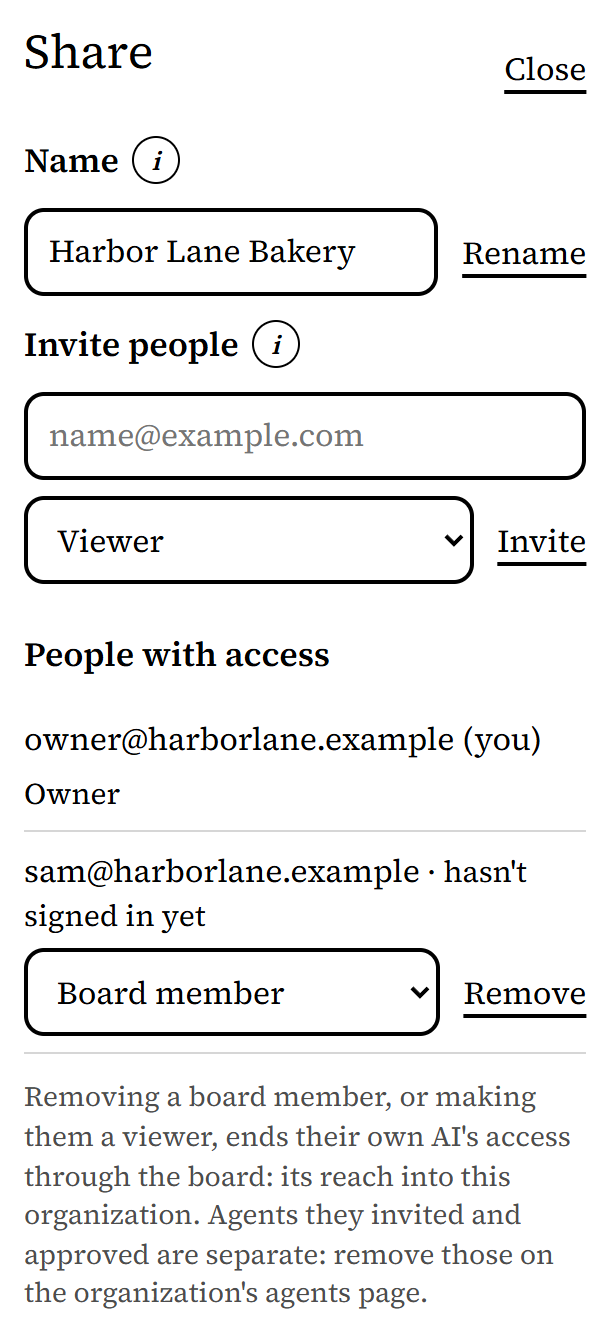
From Harbor Lane Bakery, an organization made up for these pictures. -
They open the link and sign in with Google, with that address. The organization then shows under Shared with you on their Organizations page.
-
A board member's own Claude or ChatGPT, once connected on their Connections page, can read the organization's canvas and draft changes there, as they can, and works as no role. To have an AI of theirs do a role's work, they open a live role that no agent works yet, invite it from the panel's Who fills this role?, and a board member approves it on the Board when it asks to join. The role's card then shows it.
-
With Yolo off, the jobs, requests and secrets agents ask for wait on the Board for every board member. (While Yolo is on, jobs and requests are approved as they arrive, unless an agent holds them; secrets always wait.) Sam opens the Board, reads Orders' request, and approves it. The owner's Board then shows it under Answered, approved, with Sam's email beside it.
-
When someone leaves, remove them under Share. That ends their own AI's access through the board. Make them a viewer instead if they should still be able to look. Agents they invited are separate: remove those with Remove beside them in their roles' panels, or on the Agents page.

What doesn't work yet
- Rights are for the whole organization: a board member can approve anything and change any role. Who decides what, by area, is something you agree among yourselves.
- One board member's answer decides. Where two of you must agree, agree first: the first to answer on the Board settles it.
- An agent asking to connect is approved on the Board page or in its role's panel, not on the Agents page.
- The Board records who answered each job and request. Who made each draft live is recorded by name, but edits people make in a draft are recorded as the board's.
- People sign in with Google, so they're invited by a Gmail or Google Workspace address.
- An organization has up to 50 people besides its owner.